
Most config-first apps are data-driven: forms, dashboards, and CRUD apps. Wordle isn't any of those. It's a game where you have six chances to guess a 5-letter word. Behind it: keyboard input, an algorithm that has to handle duplicate letters carefully, and animations that make it feel responsive.
I rebuilt it in Lowdefy v5 to find out where YAML stops being the clearer choice. The answer turned out to be one algorithm.
22 lines of JavaScript. No React component written.
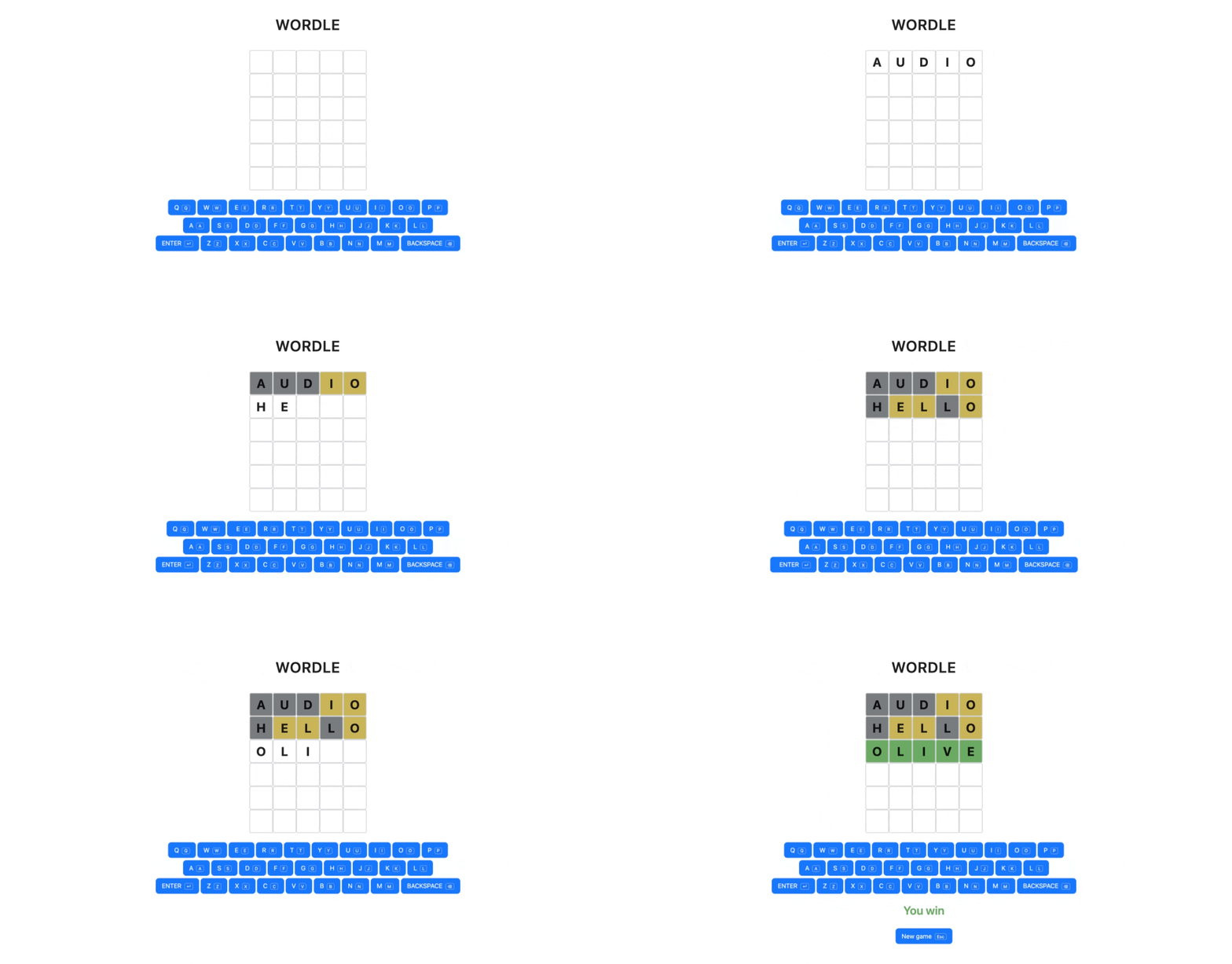 Full source on GitHub.
Lowdefy is a config-first web framework. Pages, blocks, actions, and operators are all defined in YAML. v5 added keyboard shortcuts as a one-line property on any event. Keyboard input in this build depends on it. More on v5 in the launch post.
The board, declared once and iterated
A Wordle board is 30 tiles in a 6×5 grid. The pattern is the same as in React or Vue: declare the data, let the framework iterate. In Lowdefy, iteration is expressed through block IDs that mirror the state path, not through .map() calls or v-for-style template loops.
Seed the shape on mount:
# snippet of init_state.params
board:
  - cells: [{}, {}, {}, {}, {}]
  - cells: [{}, {}, {}, {}, {}]
  - cells: [{}, {}, {}, {}, {}]
  - cells: [{}, {}, {}, {}, {}]
  - cells: [{}, {}, {}, {}, {}]
  - cells: [{}, {}, {}, {}, {}]
state.board is six rows; each row has a cells array of five placeholders. The board is now shaped data. The full init_state is in the next section.
The render is two nested List blocks with the tile body inline:
- id: board
  type: List
  layout:
    flex: 0 0 auto
  style:
    gap: 6
  properties:
    direction: column
    wrap: nowrap
  blocks:
    - id: board.$.cells
      type: List
      layout:
        flex: 0 0 auto
      style:
        gap: 6
      properties:
        direction: row
        wrap: nowrap
      blocks:
        - id: board.$.cells.$.tile
          type: Box
          layout:
            flex: 0 0 auto
          style:
            # ... static styles (60×60, border, centered text)
            backgroundColor:
              _state: colors.$.$.bg
            color:
              _state: colors.$.$.text
          blocks:
            - id: board.$.cells.$.tile.letter
              type: Markdown
              properties:
                content:
                  _string.charAt:
                    on:
                      _if:
                        test:
                          _lt:
                            - _index: 0
                            - _array.length:
                                _state: guesses
                        then:
                          _state: guesses.$
                        else:
                          _if:
                            test:
                              _eq:
                                - _index: 0
                                - _array.length:
                                    _state: guesses
                            then:
                              _state: currentGuess
                            else: ''
                    index:
                      _index: 1
              style:
                margin: 0
                lineHeight: 1
Three things are going on here.
Block IDs encode the iteration shape. board.$.cells.$.tile reads as: render the tile for each cell in each row of state.board. Each tile binds to the data path state.board[row].cells[col]. Lowdefy substitutes the $ placeholders with array indices at render time. A List block looks up state at its own block ID, treats it as an array, and renders one set of children per item.
_index gives the coordinates. Inside the deepest tile, _index: 0 returns the outer (row) index, _index: 1 returns the inner (col) index. These drive the conditional rendering: which letter to show depends on whether this row has been submitted yet.
State paths use $.$ to walk into nested arrays. _state: colors.$.$.bg resolves to state.colors[row][col].bg. Until the user submits a row, that path is undefined and backgroundColor stays unset, leaving the tile transparent. After submission, it pulls the right hex code from the parallel colour array we get to later.
One quirk: Lowdefy's _state doesn't index into strings. state.guesses is an array of 5-letter strings, and state.guesses[row][col] would be a single character in plain JavaScript, but _state: guesses.$.$ returns null. Use _string.charAt to extract the character.
The opt-out grid
Every block participates in Lowdefy's 24-column grid by default. Inside a direction: row parent, children still take full rows. One way to opt out is layout: { flex: 0 0 auto } on each child, which removes that block from the column system. The 24-column convention matches Ant Design's grid, which Lowdefy used until v5 reimplemented it in pure CSS (keeping the convention). It'll feel familiar from Bootstrap or Ant Design, surprising from Tailwind, plain CSS, or anywhere you write flexbox directly.
It's correct for dashboards and forms (the grid is doing real work there) but gets in the way for game grids. Easy to miss if you're bringing flex mental models from CSS.
Keyboard input is a v5 primitive
Wordle is keyboard-first. You type letters, you press Enter, you press Backspace. In React, that's a useEffect + keydown listener, with focus handling once you also have text inputs.
In Lowdefy v5, you put shortcut: q on a button's click event to bind the letter Q. That's the whole story. The letter button uses a build-time _var to substitute each letter:
# pages/wordle/components/letter.yaml
id:
  _var: letter
type: Button
layout:
  flex: 0 0 auto
properties:
  title:
    _string.toUpperCase:
      _var: letter
  size: large
events:
  onClick:
    shortcut:
      _var: letter
    try:
      - id: append_letter
        type: SetState
        skip:
          _or:
            - _gte:
                - _string.length:
                    _state: currentGuess
                - 5
            - _state: gameOver
        params:
          currentGuess:
            _string.concat:
              - _state: currentGuess
              - _var: letter
The same component renders a clickable button and binds the keyboard shortcut. One config path, two input methods. 26 refs in the page (one per letter), and the on-screen keyboard is the physical keyboard. They aren't wired together. They're the same thing.
A keyboard you can see and a keyboard you can press are the same config.
Enter and Backspace are inline because their actions differ from the letter actions, but the shortcut binding is identical. shortcut: Enter and shortcut: Backspace, one line each.
Why the keyboard can't use the same List pattern as the board
The board worked as a nested List because the tiles are pure render: coordinates and state, no per-item identity. I expected the keyboard to work the same way: an array of letters in state (call it kb_keys), one List, one button template. 26 letter refs become four lines.
It doesn't work. Here's why.
Lowdefy validates shortcut: at build time, and the validator wants a string literal. The framework needs to wire keyboard shortcuts during app startup; it can't bind a key to a value that isn't computed yet.
_var substitutes at build time. The build resolves a ref like:
_ref:
  path: pages/wordle/components/letter.yaml
  vars:
    letter: q
The build replaces the letter placeholder with the literal q before the schema validator runs. The validator sees a string. Build passes.
_state resolves at runtime. shortcut: { _state: 'kb_keys.$.letter' } is still an unresolved operator at build time. The validator sees an object, not a string. Build fails.
So the keyboard pays for physical-key support with 26 explicit refs. The cost shows up exactly where build-time and runtime meet, and a List driven by state can't cross that line. A click-only keyboard could; a keyboard you can press cannot.
This is the kind of constraint you only find by trying to refactor.
State as the single source of truth
The state has seven fields: a target word, the current guess being typed, an array of submitted guesses, a parallel array of colour data, two boolean flags (gameOver and won), and a structural board array the renderer iterates over.
The page initialises state when it mounts:
events:
  onMount:
    - id: init_state
      type: SetState
      params:
        target:
          _ref: pages/wordle/components/random_target.yaml
        currentGuess: ''
        guesses: []
        colors: []
        gameOver: false
        won: false
        board:
          - cells: [{}, {}, {}, {}, {}]
          - cells: [{}, {}, {}, {}, {}]
          - cells: [{}, {}, {}, {}, {}]
          - cells: [{}, {}, {}, {}, {}]
          - cells: [{}, {}, {}, {}, {}]
          - cells: [{}, {}, {}, {}, {}]
target references a separate file, random_target.yaml, that picks a random 5-letter word from a list. This is worth a short detour, because _ref is doing more work here than it appears.
# pages/wordle/components/random_target.yaml
_get:
  from:
    - merge
    - audio
    - blink
    - cliff
    - drown
    # ... 15 more words
  key:
    _random:
      type: integer
      min: 0
      max: 20
In most config systems, _ref (or its equivalent) is for components and pages: stamp out a block, give it some props, move on. Lowdefy's _ref works on any YAML node. The whole file is one operator expression (a _get from a list, with the key chosen by _random), and the value at the call site is whatever that expression evaluates to. No block, no UI, only a value.
The same _ref runs inside the reset action, so a new game gets a new word without duplicating the list.
When the user presses Enter with a 5-letter guess, five of those fields update at once: append the guess, append the colours, clear currentGuess, set won, set gameOver. The cleanest way to express that is a skip: on the action itself. When its test evaluates true, the action doesn't run at all; otherwise the writes happen unconditionally:
events:
  onClick:
    shortcut: Enter
    try:
      - id: submit_guess
        type: SetState
        skip:
          _ne:
            - _string.length:
                _state: currentGuess
            - 5
        params:
          guesses: # ... append current guess
          colors:
            _array.concat:
              - _state: colors
              - - _js:
                    fn: |
                      # ... see next section
                    args:
                      guess:
                        _state: currentGuess
                      target:
                        _state: target
          currentGuess: ''
          won: # ... _eq currentGuess and target
          gameOver: # ... won OR 6 guesses played
When the guess isn't five letters, the action skips entirely: no writes, and crucially the _js inside colors: never evaluates. That matters because Lowdefy operators evaluate eagerly: wrapping params in _if + else: {} would still call the _js on every keystroke. skip: short-circuits the action before params evaluate. Five state writes guarded by one skip:, no conditional logic threading through the writes themselves.
The same pattern appears in the append_letter action (skip if game over or row is full, shown earlier in letter.yaml) and the Backspace action (skip if game over):
- id: backspace
  type: SetState
  skip:
    _state: gameOver
  params:
    currentGuess: # ... slice last character
Three actions, one shape.
Eager evaluation
Lowdefy evaluates both branches of an _if; only the result gets selected. _if works in the board section above because picking which letter renders in a tile is a pure data lookup. Both branches evaluate freely, the cost is zero. Inside an action's params with a _js call, that same eagerness would run the function on every keystroke. skip: short-circuits at a layer that operator-level conditionals can't reach.
Written with _if, the _js runs on every keystroke:
- id: submit_guess
  type: SetState
  params:
    colors:
      _if:
        test:
          _eq:
            - _string.length:
                _state: currentGuess
            - 5
        then:
          _array.concat:
            - _state: colors
            - - _js: # ... colour function
        else:
          _state: colors
If you've worked with React's "everything is JS" mental model, this is the shift: result selection is lazy, evaluation isn't.
The colouring algorithm, and the one place I reached for JavaScript
Wordle's colouring is subtle. Three colours: green for "right letter, right position", yellow for "right letter, wrong position", grey for "not in the word". The trick is double letters. If the target is ALERT and the guess is HELLO, only the first L should be yellow. The second L should be grey, because ALERT only has one L and the first L in the guess already claimed it.
The standard algorithm is two passes over the guess, with a mutable "remaining" array of target letters:
pass 1: for each position, if guess[i] === target[i], mark green and consume target[i]
pass 2: for each not-yet-green position, if guess[i] is in remaining target,
        mark yellow and consume that target letter
Two short passes. One mutable array.
I tried writing it in Lowdefy operators. It's possible. It's also miserable. The mutable "remaining" array becomes an _array.reduce threading an accumulator through each position, with _function callbacks rebuilding labels and remaining at every step because operators don't mutate. Two reduces stacked for the two passes. 50 lines of operators where 22 lines of JavaScript would do.
So I dropped into JavaScript. Lowdefy's _js operator takes a function source string and a set of args, runs the function client-side, and returns whatever the function returns. The build hashes the function source and registers it; the runtime looks it up and executes it.
_js:
  fn: |
    const { guess, target } = args;
    const g = guess.toLowerCase();
    const t = target.toLowerCase();
    const labels = Array(5).fill('absent');
    const remaining = [...t];
    for (let i = 0; i < 5; i++) {
      if (g[i] === t[i]) {
        labels[i] = 'correct';
        remaining[i] = null;
      }
    }
    for (let i = 0; i < 5; i++) {
      if (labels[i] === 'absent') {
        const idx = remaining.findIndex((l) => l === g[i]);
        if (idx !== -1) {
          labels[i] = 'present';
          remaining[idx] = null;
        }
      }
    }
    const palette = { correct: '#6aaa64', present: '#c9b458', absent: '#787c7e' };
    return labels.map((l) => ({ bg: palette[l], text: '#ffffff' }));
  args:
    guess:
      _state: currentGuess
    target:
      _state: target
22 lines, palette included. The function returns an array of colour objects. The surrounding _array.concat appends that array to state.colors. Each tile reads its colour from state.colors[row][col] via the _state: colors.$.$.bg path we saw in the board section. Nothing else in the YAML changes.
This is what _js is for. The colouring algorithm is expressible in operators (_array.reduce, _function, an accumulator threaded through two passes), but the operator version reads worse than the JavaScript at every line of it. _js makes the choice about clarity, not necessity. The JavaScript doesn't know anything about Lowdefy. It's a pure function. Takes args, returns a value. Testable in isolation with vitest. There are no exports, no hooks, no wrapper component.
The seam between config and code is what people want to know about a config-first framework. How readable each side is on its own. How clean the boundary between them. In Lowdefy v5, the boundary is a function, registered through one operator. The 22 lines that handle Wordle's hardest piece are exactly the 22 lines you'd write in plain JavaScript.
Closing
22 lines of JavaScript. The rest, YAML. A working Wordle clone, with on-screen and physical keyboard input, colour-coded feedback respecting the double-letter rule, win/lose detection, a reset button bound to Escape, and a status display. No React component written. No manual keydown listener.
The point of this build isn't that you should ship games in YAML. It's that the boundary between "config can do this" and "you need to write code" is narrow and honest. Most of the build is paste-and-go YAML. The JavaScript handles what doesn't read well in operators.
Try it. Clone the repo, swap the word list for your own, see if you can break it. Or build something less playful with the same primitives: a multi-step form with conditional state, a keyboard-first internal tool, an action chain that needs one bit of math you can't express in operators.
This Wordle clone is the visible test of how far the config goes. What you build with the same shapes is up to you.
Lowdefy is open source and free to use. Star the repo on GitHub if this was useful.