
A Lowdefy app can now run AI agents that call your existing endpoints as tools. Add a provider connection and an agent to your app config, drop an AgentChat block on a page, and you have streaming chat wired to the API you already have. The same endpoint a button calls when a user clicks it can be called by the model mid-conversation: same routine, same connections, same auth context, same operators.
The agent's model, system instructions, tool list, and loop limits all live in YAML alongside your existing connections, endpoints, and pages. The AgentChat block ships streaming, message rendering, tool-call display, attachments, and tool approval out of the box. Multi-provider support, MCP servers, sub-agents, and page state the agent can read and write all sit in the same shape as the simplest chat.
What an agent is
An agent is a language model that uses tools in a loop. Hand it a goal in plain English ("find me a laptop under $1000") and it picks which tools to call, reads each result, and decides what to do next. The loop ends when the model gives a final answer without calling another tool, or when it hits a step limit you set.
That's the difference from a one-shot prompt. A one-shot prompt returns text. An agent picks its own path through tools and stops on its own. Three things shape that path: the model, the system instructions that set the goal and constraints, and the tool list that defines what the agent can do.
Lowdefy spreads that definition across four places, each with a different responsibility:
| Layer | Responsibility | Lowdefy key |
|---|---|---|
| Connection | Provider credentials | connections |
| Agent | Model, instructions, tools, loop control | agents |
| Tool | What the model can call to act on the world | api |
| Block | The chat UI | pages.blocks |
Each layer has its own job. Connections hold credentials, separate from any individual agent. Agents are reusable behavior: define one, drop it into any page. Endpoints already exist in Lowdefy as the way you expose backend logic to the rest of your app; adding two fields makes them callable by a model as well. Blocks stay pure UI, with no AI-specific config of their own. A block references an agent by ID and renders whatever messages come back.
Adding an agent
A chatbot in around thirty lines
plugins:
  - name: '@lowdefy/connection-anthropic'
    version: 5.3.0

connections:
  - id: claude
    type: Anthropic
    properties:
      apiKey:
        _secret: ANTHROPIC_API_KEY

agents:
  - id: chat_bot
    type: ClaudeAgent
    connectionId: claude
    properties:
      model: claude-haiku-4-5-20251001
      instructions: You are a helpful assistant. Keep responses concise.

pages:
  - id: chat
    type: PageHeaderMenu
    properties:
      title: Chat
    blocks:
      - id: chat
        type: AgentChat
        properties:
          agentId: chat_bot
          welcome:
            title: Chat
            description: Ask me anything
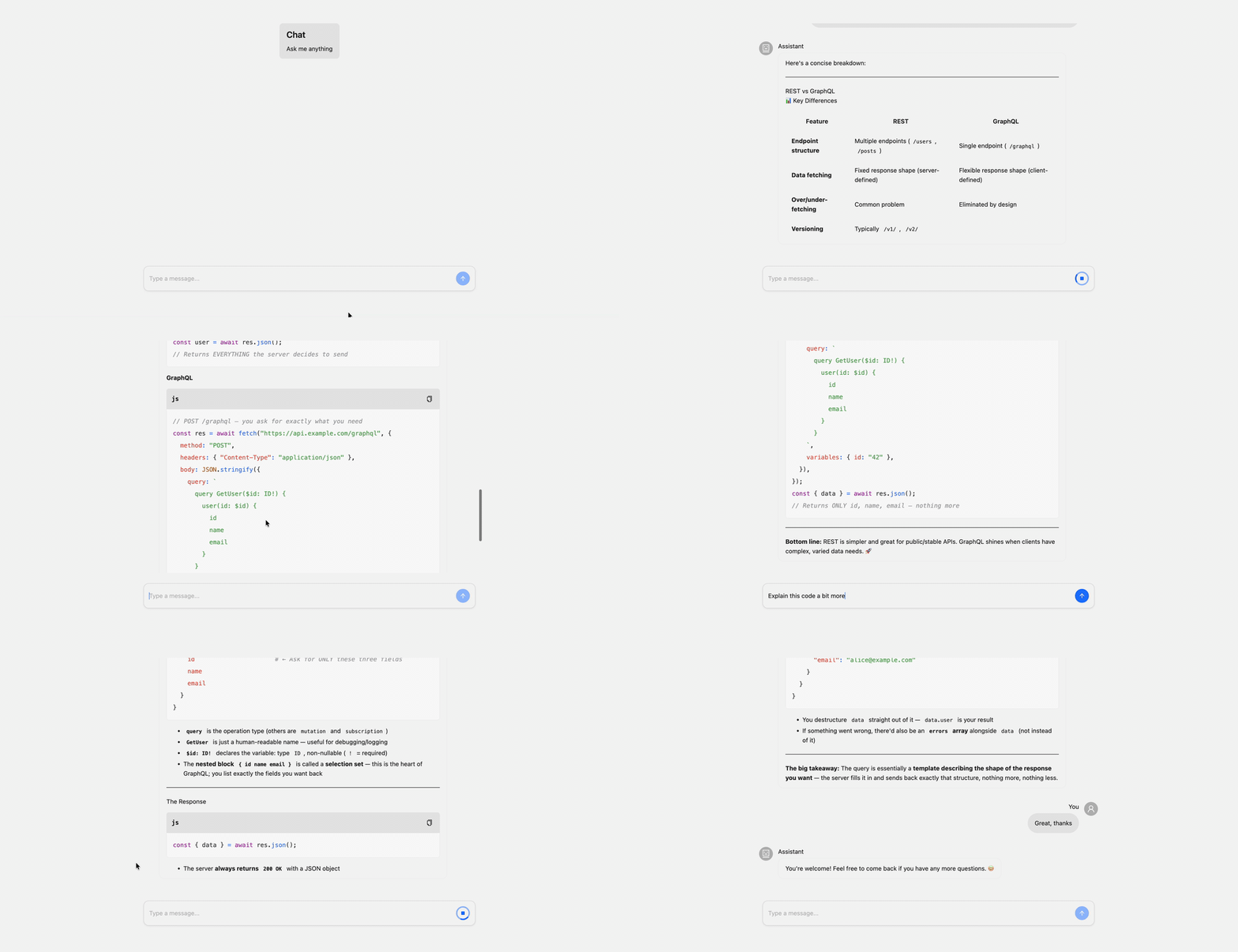
Drop your Anthropic API key into a secret called ANTHROPIC_API_KEY and the page serves a streaming chat with markdown rendering, a welcome screen, copy-message actions, and a typing indicator while the model is generating. The AgentChat block ships the things you'd otherwise wire up by hand: streaming, scroll behavior, error and abort handling, role-based avatars, an empty state, file attachments. None of those need extra config.
Endpoints as tools
An agent's tools list contains endpoint IDs. Add a description and a payloadSchema to the endpoint and it becomes eligible to be called by the model:
api:
  - id: search-products
    type: Api
    description: Search for products by name or category.
    payloadSchema:
      type: object
      properties:
        query:
          type: string
          description: Search query
      required:
        - query
    routine:
      - id: search
        type: AxiosHttp
        connectionId: catalog_api
        properties:
          url:
            _string.concat:
              - /products/search?q=
              - _payload: query
              - '&limit=5'
      - :return:
          _step: search.data.products

agents:
  - id: product_bot
    type: ClaudeAgent
    connectionId: claude
    properties:
      model: claude-haiku-4-5-20251001
      instructions: You help users find products. Search the catalog and summarize results.
    tools:
      - search-products
This endpoint is a regular Lowdefy API. A page can hit it through a CallAPI action; another endpoint can compose it as a routine step. Adding description and payloadSchema doesn't change any of that. It only makes the endpoint discoverable to the model. When the agent calls it, _payload carries the model's tool input, the same as if a page had sent it.
An agent has the same surface area as the rest of your app. Every operator, every connection, every secret, every authenticated user reference (_user) is available inside a tool's routine. An insert endpoint that writes to MongoDB is already a tool. An endpoint that calls a third-party API with a stored key is already a tool. The agent isn't a new server, it's a different caller of the server you already have.
For tools that shouldn't be exposed to the browser at all, change the type from Api to InternalApi. The endpoint stops serving HTTP requests and stays callable from agents and from other endpoints.
MCP servers by ID
Many capabilities you'd want an agent to have already exist as MCP servers: documentation lookups, web search, Slack, GitHub, Linear. Lowdefy treats an MCP server as a connection, then lets the agent pull in its tools by ID:
connections:
  - id: mcp_deepwiki
    type: Mcp
    properties:
      transport: http
      url: https://mcp.deepwiki.com/mcp

agents:
  - id: repo_bot
    type: ClaudeAgent
    connectionId: claude
    properties:
      model: claude-haiku-4-5-20251001
      instructions: You answer questions about public GitHub repos using the DeepWiki MCP server.
    mcp:
      - mcp_deepwiki
The agent picks up every tool the MCP server exposes: list, search, fetch, whatever the server publishes. Endpoint tools and MCP tools end up in the same pool by the time the model sees them. All three MCP transports are supported: Streamable HTTP (http), sse, and stdio. Prefer http for anything you're going to deploy, since stdio spawns a child process and won't survive serverless environments.
Sub-agents
An agent can call other agents as tools. The orchestrator hands the sub-agent a prompt; the sub-agent runs its own tool loop with its own model, instructions, tools, and step limit, and returns the text it produced. Define each specialist as its own agent, then list them on the orchestrator under agents:
agents:
  - id: product_researcher
    type: ClaudeAgent
    connectionId: claude
    properties:
      model: claude-haiku-4-5-20251001
      instructions: |
        Research products. Search first, then look up details for the most
        relevant matches. Summarize findings clearly.
    tools:
      - search-products
      - get-product-details

  - id: user_researcher
    type: ClaudeAgent
    connectionId: claude
    properties:
      model: claude-haiku-4-5-20251001
      instructions: Look up user information by ID and summarize.
    tools:
      - lookup-user

  - id: orchestrator_bot
    type: ClaudeAgent
    connectionId: claude
    properties:
      model: claude-sonnet-4-20250514
      instructions: |
        Coordinate specialists. Delegate product questions to product_researcher
        and user lookups to user_researcher. Synthesize results yourself.
    agents:
      - agentId: product_researcher
        description: Search and analyze products from the catalog
      - agentId: user_researcher
        description: Look up user information by ID
The orchestrator sees each sub-agent as a single tool whose description decides when it delegates.
What sub-agents buy you over packing everything into one agent: each one runs in its own context. The specialist's intermediate tool calls, raw API responses, and reasoning never enter the orchestrator's prompt. The orchestrator only sees the summary text. The specialist's tool list stays narrow, which makes tool selection more reliable. And each agent picks its own model, so coordination can run on Sonnet while the legwork runs on Haiku.
Built-in tools
Two tool sets appear automatically when you set certain agent properties, no tools: list entry required. They land in the same pool as endpoint, MCP, and sub-agent tools by the time the model sees them.
File system
Set fileSystem.basePath on the agent and four tools land in the pool: read-file, list-files, search-files, stat-file. Every path is resolved against the base directory and any path that escapes is rejected, so the agent can browse the directory and nothing else.
agents:
  - id: docs_bot
    type: ClaudeAgent
    connectionId: claude
    properties:
      model: claude-haiku-4-5-20251001
      instructions: You answer questions using the knowledge base.
      fileSystem:
        basePath: ./knowledge-base
This is the simple way to point an agent at a corpus: a directory of markdown files, a snapshot of internal docs, a vendored SDK source tree. Reads are capped at 512 KB per file, search caps at 200 matches and skips files over 1 MB. In production builds the directory is copied into the server bundle automatically.
Page state
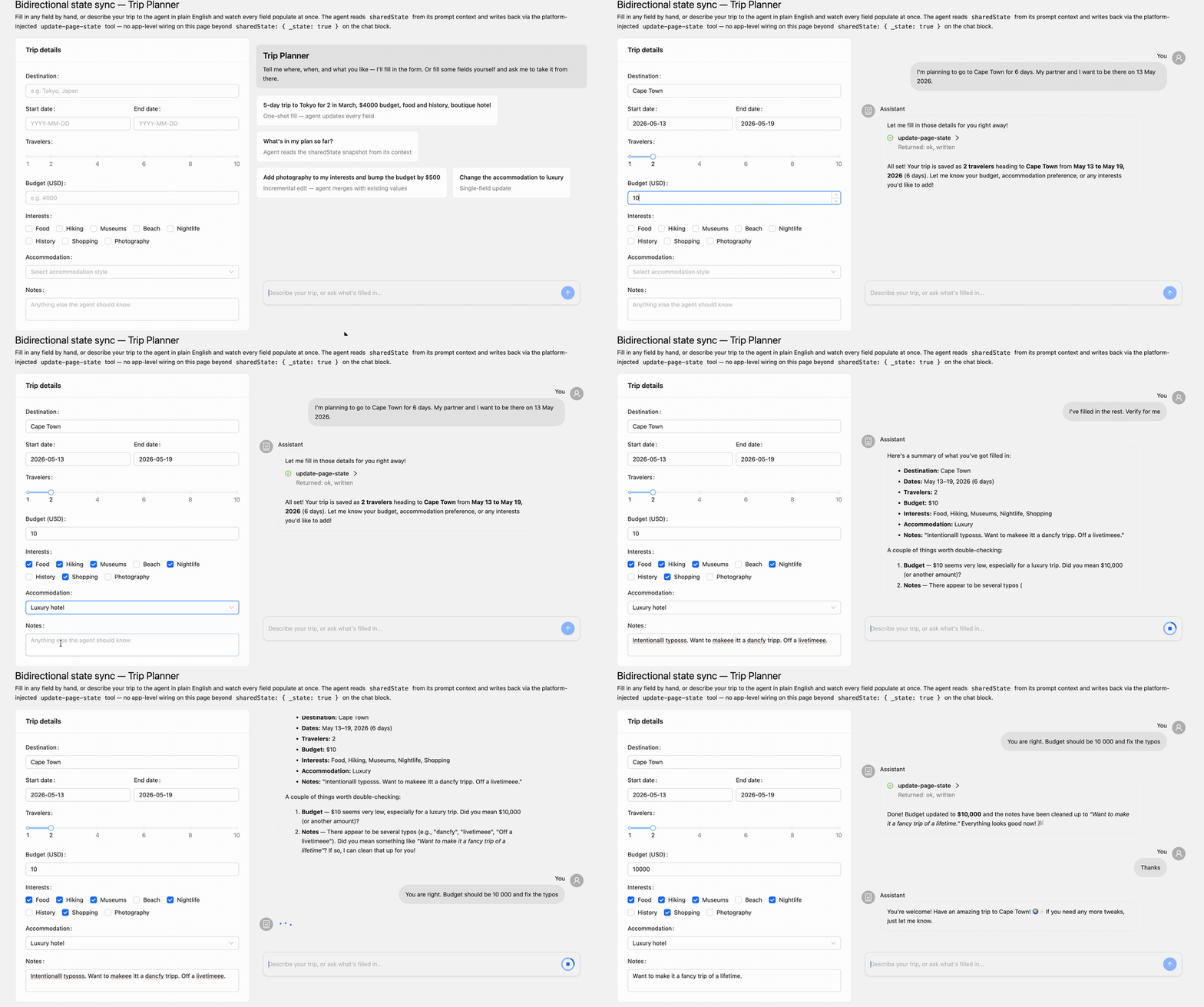
The AgentChat block can expose a slice of page state to the agent. Set sharedState on the block to an operator expression that evaluates to an object. The agent then receives an update-page-state tool that lets it write back. If the agent also sets pageContext: true, the current values are sent in its prompt as a context block on every message.
agents:
  - id: form_bot
    type: ClaudeAgent
    connectionId: claude
    properties:
      model: claude-haiku-4-5-20251001
      pageContext: true
      instructions: |
        Help the user fill in the form. Read sharedState to see what's
        already entered. When the user provides new values, call
        update-page-state with an `updates` object.

pages:
  - id: form
    type: PageHeaderMenu
    properties:
      title: Form
    slots:
      content:
        blocks:
          - id: company_name
            type: TextInput
          - id: employee_count
            type: NumberInput
          - id: chat
            type: AgentChat
            properties:
              agentId: form_bot
              sharedState:
                _state: true
sharedState: { _state: true } exposes the whole page state; a curated shape like { company: { _state: company_name } } exposes a subset. Writes are scoped to the keys you exposed and applied through SetState, so the page re-renders without extra wiring.
Going further
Routing across providers
An agent can route through the Vercel AI Gateway and reach Claude, GPT, Gemini, and self-hosted open models with one config. Use the gateway connection and a provider/model string, optionally hand it a fallback list, and the gateway handles failover, attribution, and bring-your-own-key credentials per request:
connections:
  - id: ai_gateway
    type: AIGateway
    properties:
      apiKey:
        _secret: AI_GATEWAY_API_KEY

agents:
  - id: chat_bot
    type: AIGatewayAgent
    connectionId: ai_gateway
    properties:
      model: anthropic/claude-sonnet-4.6
      fallbackModels:
        - openai/gpt-5-mini
        - google/gemini-2.5-pro
      tags: [production, chat]
      instructions: You are a helpful assistant.
Set zeroDataRetention: true to restrict routing to providers that don't retain prompts. The agent config doesn't change. Only the routing does.
React to what the agent is doing
An agent fires lifecycle events at six points: onStart, onStepStart, onToolCallStart, onToolCallFinish, onStepFinish, onFinish. Each one can fire a Lowdefy endpoint with the event payload. Persisting a conversation, recording usage, sending a Slack notification when a tool runs, or streaming a custom data part back to the page are all just endpoint calls:
agents:
  - id: chat_bot
    type: ClaudeAgent
    connectionId: claude
    properties:
      model: claude-haiku-4-5-20251001
      instructions: You are a helpful assistant.
    hooks:
      onFinish:
        - save-conversation
        - record-usage
Hooks run with the same connection, operator, and auth context as any other endpoint. You're calling endpoints you'd already write.
Citations
When a tool returns source citations (many public MCP servers do), the chat can render them inline beneath the answer. Set messageDisplay.showSources: true on the chat block:
- id: chat
  type: AgentChat
  properties:
    agentId: docs_bot
    messageDisplay:
      showSources: true
Sources arrive as source-url and source-document parts in the agent's response stream and surface as expandable cards next to the message. No extra wiring on the agent side. If a tool publishes sources, the block displays them.
Tool approvals
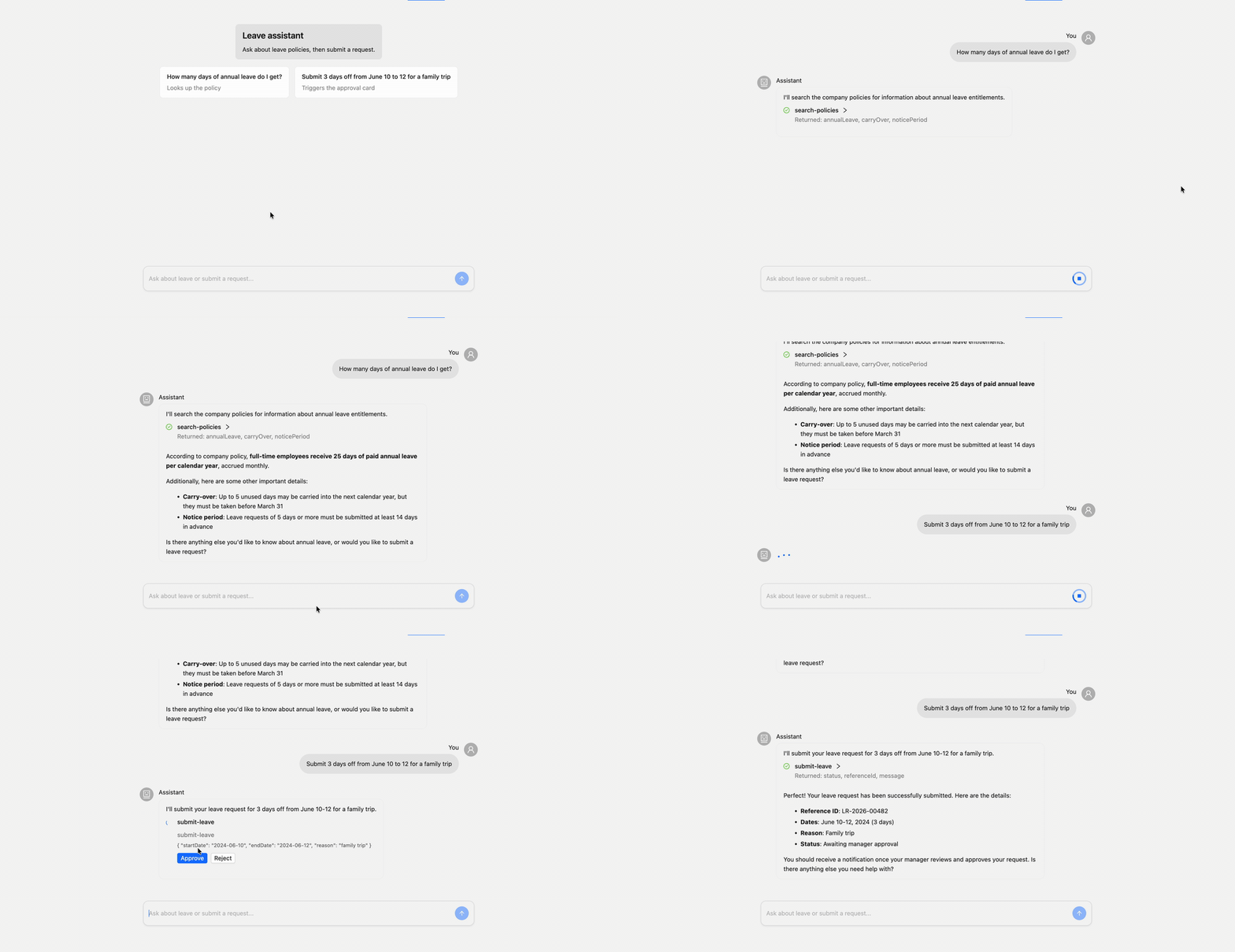
Some tools want a human to approve them before they run. Set confirm: true on the tool reference and the chat block renders an approve/reject card inline:
agents:
  - id: leave_bot
    type: ClaudeAgent
    connectionId: claude
    properties:
      model: claude-haiku-4-5-20251001
      instructions: |
        You help with leave requests. Use search to look up policies.
        Submit only when the user agrees.
    tools:
      - search-policies
      - endpointId: submit-leave
        confirm: true
search-policies is read-only and runs immediately. submit-leave writes to the database, so the model's tool call surfaces in the chat as a card showing the proposed input alongside approve and reject buttons. The endpoint runs only after approval. The two forms in the tools list (the bare ID and the object with endpointId) both work; the object form unlocks per-tool flags. confirm: true also works on MCP tools.
There's a lot more to discover: drawer mode for floating chat, message regeneration, custom roles and avatars, file attachments, dynamic per-step tool phasing, message history pruning, custom data parts. See the docs for the full set.
The agent runtime is the Vercel AI SDK under the hood, and the AgentChat block sits on Ant Design X.
Your Lowdefy app can now have an agent that knows what your app knows.