
Most web frameworks tend to make you write a lot of code before anything actually works. A React form needs state hooks, event handlers, validation logic, JSX markup, and probably a CSS file. A dashboard needs a charting library, data fetching, data filtering, and loading states. A data table needs... you get the idea.
Sometimes I don't want to obsess over syntax and convoluted setups. I just want to describe what I need and have it work.
Lowdefy is an open-source, config-first web framework. You write YAML, and it gives you a front-to-back web app. It's built on Next.js with 70+ UI components, database connectors, and built-in auth, without the need to write any React or JavaScript. When you hit a wall, there's support for custom plugins and a _js operator that lets you drop into JavaScript when you need to.
I put together three examples to showcase it, each built in 50 lines of YAML.
1. A Validated Contact Form That Saves
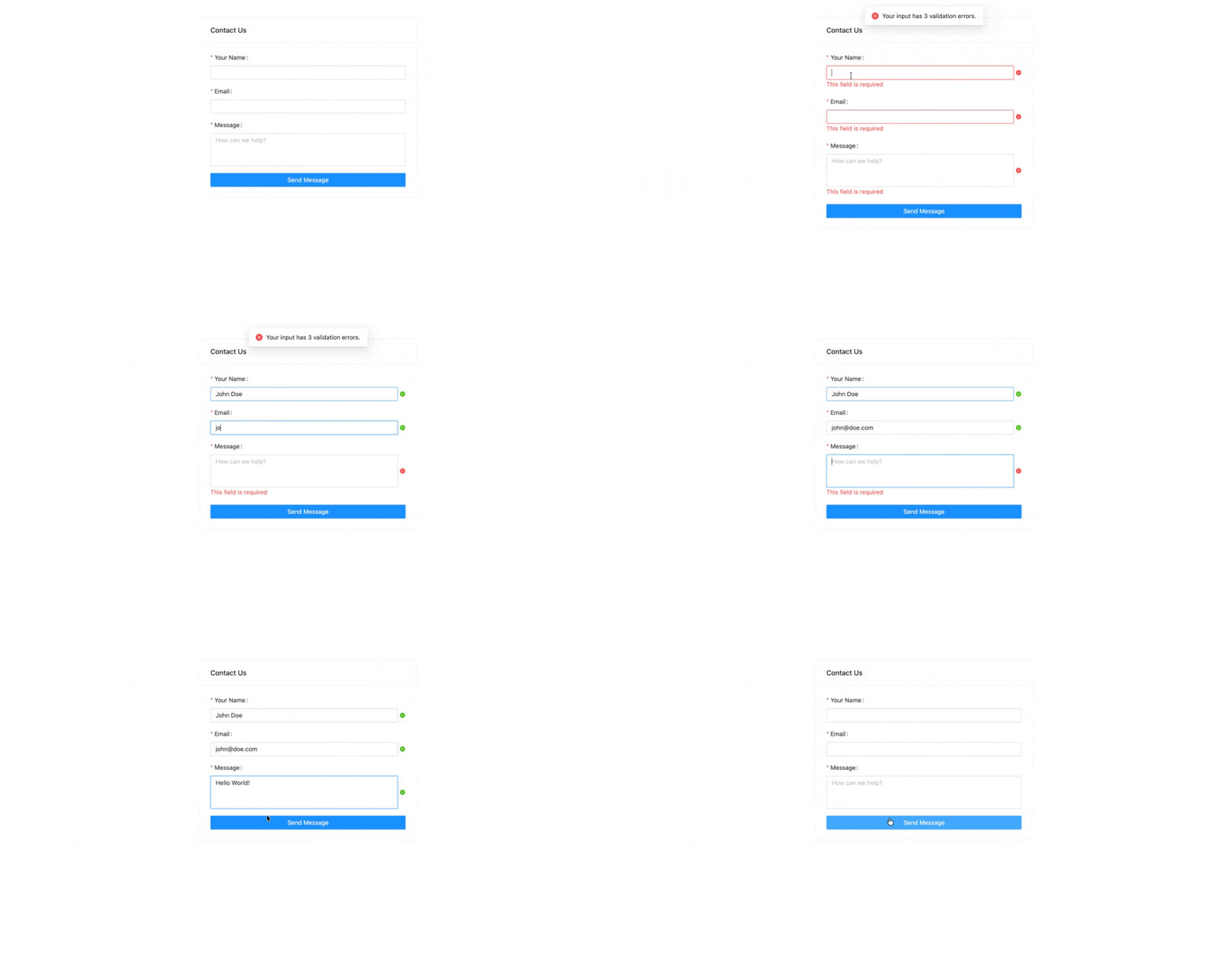
Let's start simple. A contact form with three fields, required validation, a database save, and a reset. Normally you'd need a React component, a validation library, an API route, and a database client.
In Lowdefy:
id: contact-us
type: Card
layout:
  contentGutter: 16
properties:
  title: Contact Us
style:
  width: 500
  margin: 40px auto
requests:
  - id: save_message
    connectionId: contact-messages
    type: MongoDBInsertOne
    payload:
      form:
        _state: form
    properties:
      doc:
        _payload: form
blocks:
  - id: form.name
    type: TextInput
    required: true
    properties:
      title: Your Name
  - id: form.email
    type: TextInput
    required: true
    properties:
      title: Email
  - id: form.message
    type: TextArea
    required: true
    properties:
      title: Message
      placeholder: How can we help?
  - id: submit
    type: Button
    properties:
      title: Send Message
      block: true
    events:
      onClick:
        - id: validate
          type: Validate
        - id: save
          type: Request
          params: save_message
        - id: reset
          type: Reset
50 lines. That gives you:
- Three input fields with labels
- Required field validation. Click "Send Message" with empty fields and you get inline error messages
- A MongoDB insert that saves the form data
- A form reset after submission
- A centered card layout
The events.onClick array defines the entire flow. Actions run sequentially: validate first, then save to the database, then reset. If validation fails, the chain stops. No if statements, no try-catch. Just declare the flow.
Notice how the input ids are prefixed with form.. That nests them under a form object in the page state. The payload passes that object to the server via _state: form, and the request accesses it with _payload: form to save as the document. Clean separation between client and server. The connectionId references a database connection defined in lowdefy.yaml, which we'll show at the end.
2. An Interactive Sales Chart
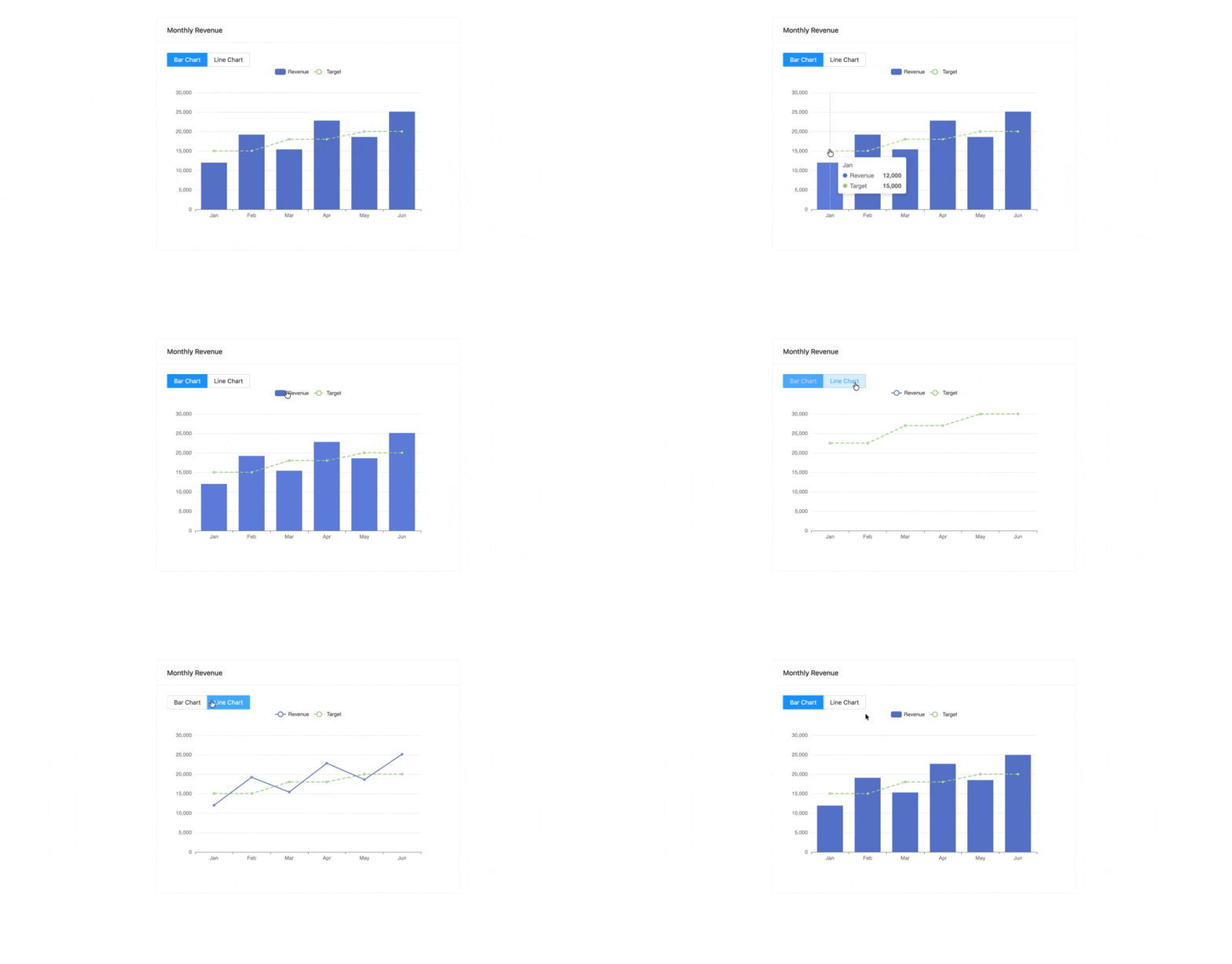
Dashboards are usually where the complexity explodes, between charting libraries, data transformations, and responsive containers. Here's a bar chart with a toggle, a target line, and a legend, all powered by Apache ECharts under the hood:
id: monthly-revenue
type: Card
properties:
  title: Monthly Revenue
style:
  maxWidth: 700
  margin: 40px auto
events:
  onMount:
    - id: set_default
      type: SetState
      params:
        chart_type: bar
blocks:
  - id: chart_type
    type: ButtonSelector
    properties:
      label:
        disabled: true
      options:
        - label: Bar Chart
          value: bar
        - label: Line Chart
          value: line
  - id: revenue_chart
    type: EChart
    properties:
      height: 400
      option:
        tooltip:
          trigger: axis
        legend:
          data: [Revenue, Target]
        xAxis:
          type: category
          data: [Jan, Feb, Mar, Apr, May, Jun]
        yAxis:
          type: value
        series:
          - name: Revenue
            type:
              _state: chart_type
            data: [12000, 19200, 15400, 22800, 18600, 25100]
          - name: Target
            type: line
            data: [15000, 15000, 18000, 18000, 20000, 20000]
            lineStyle:
              type: dashed
48 lines. Two series, a legend, tooltips, and an interactive toggle. Hover over any bar to see the tooltip, and click a series name in the legend to toggle it on or off.
The chart type is bound to the selector's state through this line:
type:
  _state: chart_type
_state is a Lowdefy operator, a function that runs inline in your config. When the user clicks "Line Chart", the selector's value changes to line, and the chart re-renders as a line chart. No event handler. No manual state wiring. The binding is declarative.
Lowdefy has 50+ operators like this. _if for conditionals, _sum for math, _string for text manipulation, _array for list operations. You can combine them to handle most logic without needing to write any JavaScript.
To pull data from a real API or database, replace the hardcoded
dataarray with_request: my_sales_dataand add a MongoDB or REST request to the page. The chart updates automatically. We show exactly how in the next example.
3. A Database-Powered Company Search
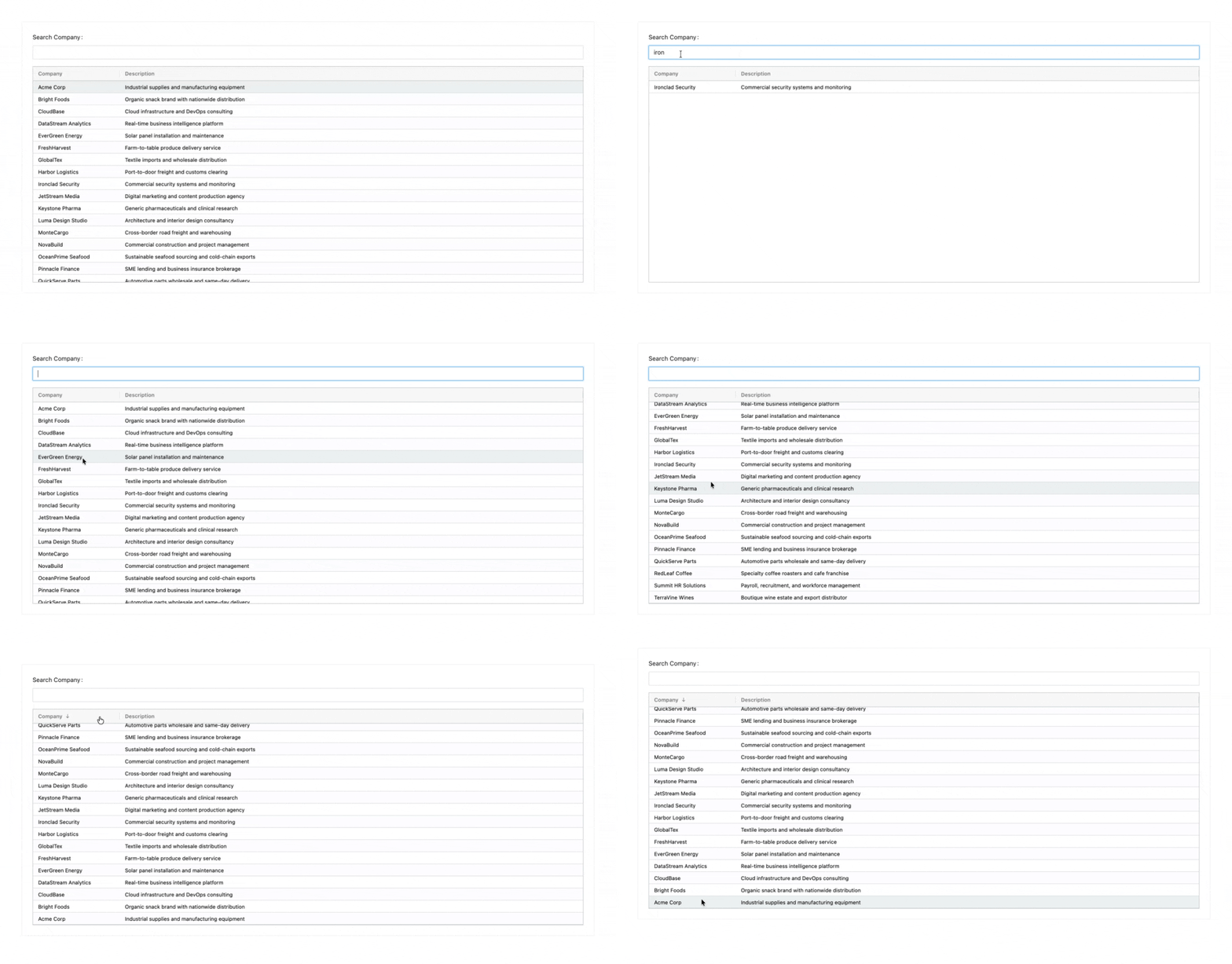
The first example wrote to a database, and this one reads from it. A searchable company directory that queries MongoDB in real time, with a sortable table. Usually that means a backend API, a frontend data table library, and a search implementation:
id: company-search
type: Card
layout:
  contentGutter: 16
style:
  margin: 50
requests:
  - id: get_companies
    connectionId: companies
    type: MongoDBAggregation
    payload:
      search:
        _state: search
    properties:
      pipeline:
        - $match:
            trading_name:
              $regex:
                _if_none:
                  - _payload: search
                  - ''
              $options: i
events:
  onMount:
    - id: fetch
      type: Request
      params: get_companies
blocks:
  - id: search
    type: TextInput
    properties:
      title: Search Company
    events:
      onChange:
        - id: refetch
          type: Request
          params: get_companies
  - id: companies_table
    type: AgGridBalham
    properties:
      overlayNoRowsTemplate: Loading...
      rowData:
        _request: get_companies
      columnDefs:
        - headerName: Company
          field: trading_name
          sortable: true
        - headerName: Description
          field: description
          flex: 1
50 lines. That includes:
- Aggregation pipeline -
MongoDBAggregationruns a native MongoDB pipeline. The$matchstage uses_if_noneto handle the initial null state. When the search is empty, the regex matches everything. You could add$lookup,$group, or$projectstages just as easily. - Payload - client state is passed to the server-side request via
payload, then accessed with_payloadin the pipeline. - Live search - every keystroke fires
onChange, which re-runs the aggregation. The table updates instantly. - Data binding -
_request: get_companiespipes the aggregation results directly into the table'srowData. When the request re-runs, the table re-renders.
The connections and pages are all defined in your app's lowdefy.yaml config file:
lowdefy: 4.7.2
name: Lowdefy starter

connections:
  - id: contact-messages
    type: MongoDBCollection
    properties:
      collection: contact-messages
      databaseUri:
        _secret: MONGODB_URI
      write: true
  - id: companies
    type: MongoDBCollection
    properties:
      collection: companies
      databaseUri:
        _secret: MONGODB_URI

pages:
  - _ref: contact-us.yaml
  - _ref: monthly-revenue.yaml
  - _ref: company-search.yaml
Secrets are managed through environment variables, never hardcoded in config.
The Bigger Picture
Three examples, ~150 lines of YAML total:
- A validated form with a database save
- An interactive chart with state-driven rendering
- A searchable data table with live MongoDB queries
In React, the equivalent would easily be 300-500 lines across component files, hook logic, API routes, validation, and CSS. Here, it's all in the config.
For perspective, we run production apps on Lowdefy, including a manufacturing ERP with 390+ pages, a multi-app CRM with complex multi-step workflows, and a support desk serving 400+ client companies. All built with the same framework and same YAML-first approach, just scaled up.
Getting Started
Want to try it? Create an empty directory and run:
pnpx lowdefy@4 init && pnpx lowdefy@4 dev
Drop any of the examples above into a .yaml file in your app directory, reference it in lowdefy.yaml, and you're running.
What's Next
These 50-line examples barely scratch the surface. Lowdefy ships with:
- 70+ UI blocks - from date pickers and file uploads to Google Maps and QR scanners
- 10+ connectors - MongoDB, PostgreSQL, MySQL, SQLite, Google Sheets, Elasticsearch, S3, Stripe
- Built-in auth - powered by NextAuth.js, with OAuth, custom providers, and role-based access control (RBAC)
- PDF generation, CSV export, geolocation - all as config-level actions
If you're curious, the examples above are a good place to start. Honestly, my favourite part about Lowdefy is not having to deal with braces and semicolons.
Lowdefy is open source and free to use. Star the repo on GitHub if this was useful.