
A new Lowdefy app no longer starts empty. Install five modules in your lowdefy.yaml and your app has login, user admin, audit trails, file uploads, and entity management. The pages, save routines, and access models are all in place, configured through vars you set when you install them.
Two things ship in this release: the module system itself, built into the Lowdefy framework, and modules-mongodb, a library of modules for MongoDB-backed apps.
What a module is
A module is a git repo with a module.lowdefy.yaml manifest at its root. The manifest declares what the module exposes and the configuration vars the installing app must provide.
You install a module by adding an entry to your app's lowdefy.yaml:
modules:
  - id: user-admin
    source: "github:lowdefy/modules-mongodb/user-admin@v1"
    vars:
      app_name: my-app
      roles:
        - admin
        - user
Three fields. The source points at a git repo, subpath, and tag. The vars pass configuration the module is designed to accept, typed and validated against the module's declared schema. The id is yours to choose, and it becomes the URL prefix for every page the module contributes. With the entry above, /user-admin/all is the user list and /user-admin/invite is the invite page. Rename the id to team-members and those paths become /team-members/all and /team-members/invite.
Beyond bootstrap
For teams running more than one app, modules are the place your conventions live. The patterns you'd otherwise copy between projects become a versioned dependency you upgrade in one place: your User shape, your Company shape, your audit format.
Modules in modules-mongodb are designed to plug into each other. Files attaches to any entity. Events logs from any save. Notifications fires from any event. The result is an integrated foundation, not a stack of unrelated features.
Anyone can publish a module
Any git repo with a manifest is a module. No registry, no approval, no naming claim. Public modules from the Lowdefy team, private libraries from your own team, and community modules all install the same way. Point the source at a private repo, authenticate the build, and you're done.
modules-mongodb
The module system is a framework feature. modules-mongodb is the first library that builds on it: a set of modules covering features most apps need, patterned for MongoDB.
Layout
The layout module wraps every page from every other module: header with app title and logo, navigation menu, breadcrumb, page actions area, floating save/cancel footer. Three implementations ship: header-menu, side-menu, and page-sidebar. Pick one in your app config. If you later prefer a different shape, change the source string and every page in every installed module picks up the new shell.
Blocks inside modules respect your app's theme variables. Set your colors and typography in the app config, and the module's pages pick up your branding without any restyling.
The module exports four components that other modules use internally: page, card, floating-actions, and auth-page. Use them in your own custom pages too, so a page you wrote sits inside the same chrome as the module pages.
Events
Events is the audit layer. Changes flow through a single API endpoint with a consistent format, so the audit trail looks the same whether the change came from user admin, a custom page, or another module. The module provides an events-timeline component you drop onto any detail page to show that record's history: who changed what, when, and what the previous value was.
The timeline shows file attachments and change summaries inline. Save routines use a change-stamp component to mark records with who last updated them.
User Account
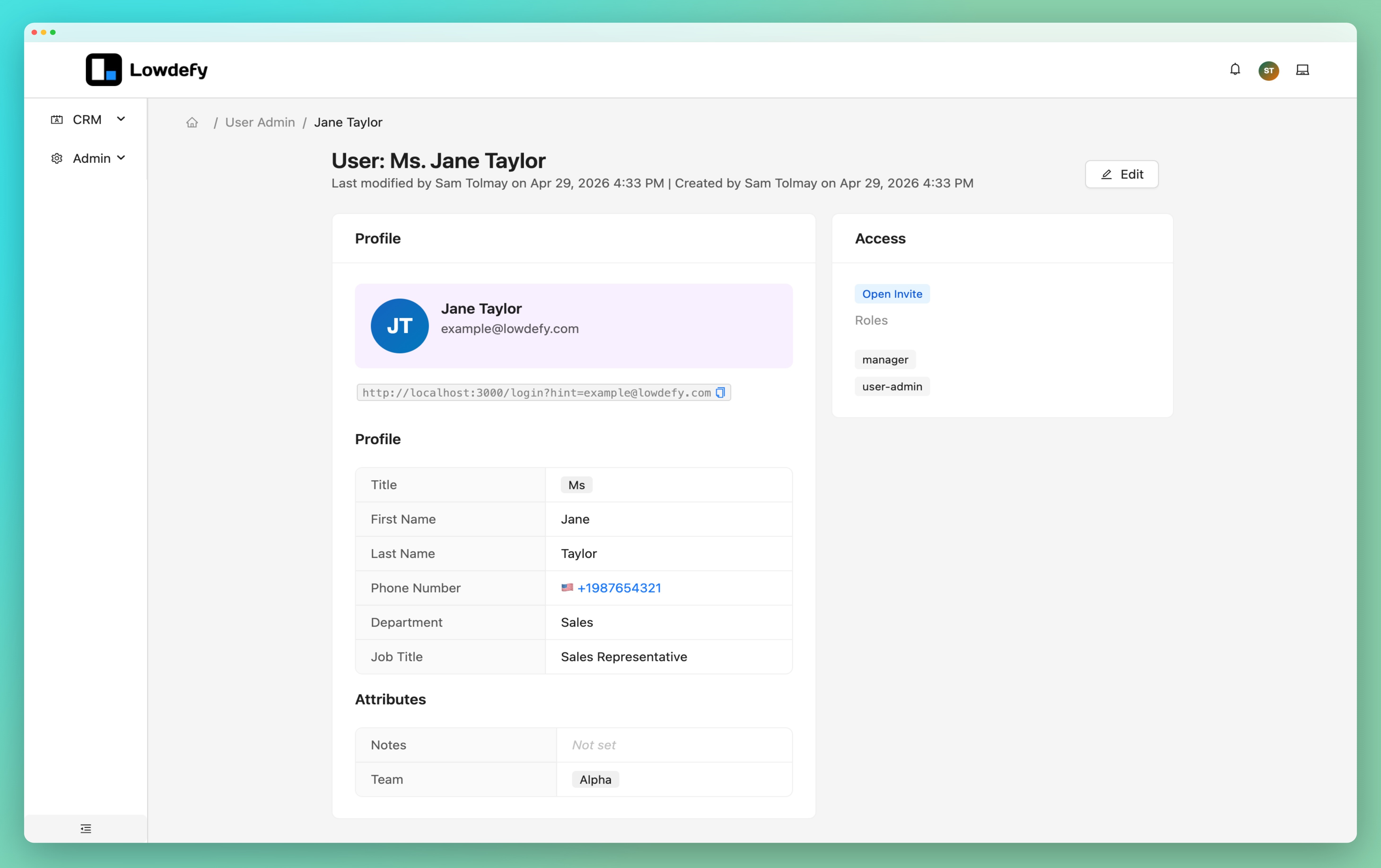
The user account module handles the logged-in user's relationship with the app: passwordless login by email, invite verification, and self-service profile editing. Each user gets a generated SVG avatar based on their name.
Lowdefy apps are invite-only by default. There's no public sign-up form. New users come in through the user admin module's invite flow, verify by email, and pick a display name. That workflow is hard to assemble out of the auth providers and identity platforms most teams reach for, and it's the right shape for the internal tools and customer portals Lowdefy apps tend to be.
Auth pages use the layout module's auth-page component, so the login screen matches the rest of your app. The module exports three header components (a user avatar with popover menu, a compact avatar for mobile, and mobile drawer buttons) that you embed in whatever layout you're using. Profile changes log as events separate from admin actions, so the audit trail shows whether someone edited their own profile or an admin edited it for them.
User Admin
User admin is the other half: the app administrator managing other users. List page with filters, role badges, and export. Invite page with an email routine. Edit page for changing roles and access. Account deactivation.
Install user admin once per user population. A team portal and a client portal each get their own user-admin entry, with different ids, different roles, and different URL namespaces.
The module exports a user-selector dropdown for forms elsewhere in your app. Assigning a ticket or setting a "created by" reference is a drop-in.
Companies
The companies module is an entity CRUD built to a pattern: list page, detail page, edit page, create page. Fields cover the basics: name, identifiers, contact info, and links to contacts. The detail page shows a contacts sidebar tile, an activity timeline from the events module, and a file upload panel from the files module.
Companies exports a company-selector dropdown. Use it in any form that needs to pick a company. When a contact is linked to a company through the selector, the relationship is recorded on both sides, so the company's detail page immediately shows the new contact in its sidebar.
Contacts
Contacts follows the same pattern as companies: list, detail, edit, create, plus a contact-selector component. Fields for name, email, phone, job title, and department. Links to companies are bidirectional and stay in sync through the selector.
Files
Files handles upload, download, and metadata for attachments. Files live in S3. Metadata lives in a separate MongoDB collection, so entity documents stay light. The module exports a file-upload block and a file-list block that companies, contacts, and your own pages drop onto detail pages to get attachments per record.
Upload from the browser, list what's attached to a record, download with a click, delete when it's no longer needed.
Notifications
Notifications gives your users an in-app inbox. Other modules log a notification through a single API endpoint (an invite sent, a record assigned), and the inbox page shows the user's notification history with an unread count in the header.
Email and other channels currently dispatch through an external service you wire up. A built-in delivery layer is on the roadmap.
Release Notes
The release notes module maintains a per-app changelog. Write an entry per release; the module renders it as a page your users can read from the app menu.
What's next
More modules coming soon: workflows, CRM, and support desk.
Installing them
Here's an app config that pulls in a few modules:
modules:
  - id: layout
    source: "github:lowdefy/modules-mongodb/layout-sider-menu@v1"
    vars:
      app_title: My App

  - id: events
    source: "github:lowdefy/modules-mongodb/events@v1"
    vars:
      app_name: my-app

  - id: user-admin
    source: "github:lowdefy/modules-mongodb/user-admin@v1"
    vars:
      app_name: my-app
      roles: [admin, user]

  - id: companies
    source: "github:lowdefy/modules-mongodb/companies@v1"

  - id: contacts
    source: "github:lowdefy/modules-mongodb/contacts@v1"
Modules can use components from other modules, and so can your custom pages. Use a _ref to drop one in:
blocks:
  - _ref:
      module: companies
      component: company-selector
      vars:
        id: customer
The demo app in modules-mongodb/apps/demo wires all of this together. Clone it, install dependencies, point it at a MongoDB URI, run lowdefy dev, and you have an app to click through.
Next steps
- Read the docs. How modules work, how to install them, and how to use components across modules.
- Write your own. Any git repo with a
module.lowdefy.yamlis a module. The authoring guide covers the manifest schema, the_module.*operators, connection remapping, and plugin declarations.
modules-mongodb is a starting library, not the only one. Modules install the same way whether they come from us, from your team, or from the community.